How to Implement Effective Automation Systems for Your Business?
In today's fast-paced business landscape, effective automation systems have become essential. According to a report from McKinsey, nearly 45% of activities could be automated using current technologies. This statistic highlights the potential for efficiency and cost-saving benefits. However, many businesses struggle to implement these systems effectively.
Daniel F. Harlow, an expert in automation systems, states, "The right automation strategies can transform operations, but they require careful planning and adaptation." This insight points to the complexities involved in integrating automation into existing workflows. Companies often underestimate the need for employee training and process redesign.
Implementing automation is not without challenges. Some businesses face resistance from staff who fear job loss. Others encounter technical difficulties during integration. Understanding these barriers is crucial. Only by addressing them can companies fully harness the power of automation systems. The journey demands adaptability, continuous learning, and a willingness to refine processes along the way.

Identifying Key Processes for Automation in Your Business
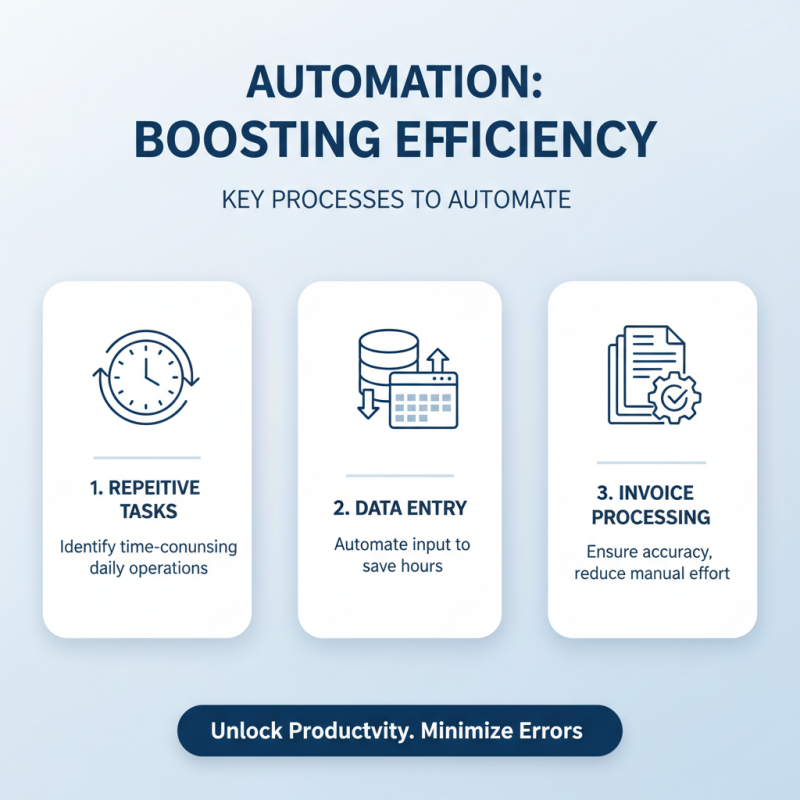
Identifying key processes for automation is crucial for enhancing business efficiency. Start by analyzing your daily operations. Look for repetitive tasks that consume significant time. For instance, data entry and invoice processing often require manual input. Automating these can save hours, yet it’s important to ensure accuracy.
Next, evaluate customer service interactions. Chatbots can respond to basic inquiries, providing timely support. However, not all queries can be resolved this way. It’s vital to recognize when human intervention is necessary. Also, be cautious; relying too much on automation may frustrate some customers.
Lastly, consider your supply chain management. Automating inventory tracking can streamline operations. Yet, be aware of potential limitations in forecasting demand. Reflect on your processes regularly. Automation should enhance, not replace, human oversight.
Evaluating Automation Tools and Technologies Available
When evaluating automation tools and technologies for your business, consider your specific needs. Different departments have unique requirements. For example, marketing may need tools for email automation, while HR might focus on applicant tracking systems. Understanding these nuances is vital.
Tips: Identify your pain points. What tasks are repetitive? Where do bottlenecks occur? Create a list of these issues. This will guide your tool selection process.
Flexibility is another key factor. Many tools offer customizable features. However, be cautious. Customization can lead to complexity. It's important to find a balance. Too much complexity may hinder your team's productivity instead of helping it.
Tips: Start small. Choose one or two tools for a pilot test. Gather feedback from the team. This will help you understand if the tools truly meet your expectations.
Lastly, consider integration capabilities. Automation tools should work well with existing systems. A lack of integration can create more problems. Ensure your chosen technologies communicate effectively with each other. This ensures a seamless workflow.
Efficiency of Automation Tools in Business Operations
This bar chart illustrates the percentage of efficiency improvement achieved through various automation tools in business operations. The data demonstrates that implementing automation in inventory control and customer management yields the highest enhancements in efficiency.
Developing a Step-by-Step Implementation Plan
Implementing automation systems can boost productivity. Start by defining clear goals. Know what tasks you want to automate. For example, automating inventory management can save time and reduce errors. This clarity will guide your entire process.
Next, assess your current processes. Identify areas that require improvement. Talk to your team about their challenges. Gather their insights. This will help you pinpoint the right automation tools. Some tools may not fit all tasks. Testing a few options can be beneficial.
After selecting the tools, create a detailed action plan. Assign responsibilities to team members. Set realistic deadlines. Monitor progress regularly. Adjust the plan as needed. Be prepared for setbacks. Listen to feedback to refine your approach continuously. Automation should simplify tasks, not complicate them.
How to Implement Effective Automation Systems for Your Business? - Developing a Step-by-Step Implementation Plan
| Step |
Description |
Duration |
Resources Needed |
Responsible Team |
| 1 |
Identify Business Processes for Automation |
1 Week |
Process mapping tools, stakeholder interviews |
Management Team |
| 2 |
Set Automation Goals and KPIs |
1 Week |
Analytics tools, benchmarking data |
Project Management Team |
| 3 |
Select Automation Tools and Platforms |
2 Weeks |
Vendor comparisons, trial versions |
IT Team |
| 4 |
Develop Integration Plan |
3 Weeks |
API documentation, data mapping |
Development Team |
| 5 |
Test Automation Systems |
2 Weeks |
Test cases, user feedback |
Quality Assurance Team |
| 6 |
Launch Automation Systems |
1 Week |
Deployment tools, monitoring systems |
Operations Team |
| 7 |
Monitor Performance and Optimize |
Ongoing |
Analytics tools, feedback loops |
Continuous Improvement Team |
Training Employees for Smooth Automation Integration
Training employees is vital for successful automation integration. An effective automation system requires everyone to be on board. Without proper training, confusion often arises. Employees may resist new technologies. This resistance can hinder progress.
Encouraging an adaptive mindset is essential. Create a training program that addresses specific needs. Offer hands-on workshops. This way, employees can practice in a safe environment. Include real-life scenarios they may face at work. Role-playing can enhance understanding of automation tools.
Tips: Start with basics. Explain why automation is necessary. Encourage questions to clear doubts.
Provide ongoing support through refresher courses.
Acknowledge mistakes in the learning process. This helps in building confidence. Engage employees regularly to gather feedback. Monitor their comfort level with new systems. Regular check-ins foster open communication and reduce resistance.
Monitoring and Adjusting Automation Systems for Efficiency
Monitoring and adjusting automation systems is crucial for efficiency. Many businesses report that automation can improve productivity by up to 30%. However, simply implementing these systems isn't enough. Regular evaluation is needed to ensure they operate at peak performance.
One key area is data analytics. Collecting data on automation performance can reveal areas for improvement. For instance, system downtime or slow response times may indicate the need for adjustments. Companies often overlook this aspect, leading to wasted resources and lost opportunities.
Tip: Schedule regular reviews of automation metrics. This will help identify inefficiencies.
Additionally, employee feedback can provide insights into system usability. Engaging your team can surface issues that data alone might miss. Some workers may feel overwhelmed by automation's speed. Addressing these concerns is crucial for a smooth operation.
Tip: Hold open discussions about automation challenges. This fosters a culture of continuous improvement.